
Introduction
Give an AI agent an iPhone. It checks every step it takes.
ios-agent lets an AI agent use an iOS Simulator or a real iPhone, over a cable or Wi-Fi. Every action returns the screen it produced, so the agent can tell when a tap did nothing or typed text did not land. Screens arrive as a few hundred tokens rather than tens of thousands. Anything that sends, pays, deletes or reaches another person asks first. It uses only Apple’s public APIs, so an Xcode update does not break it. Use it from the terminal, from Claude Code or any MCP client, or as a Python library.
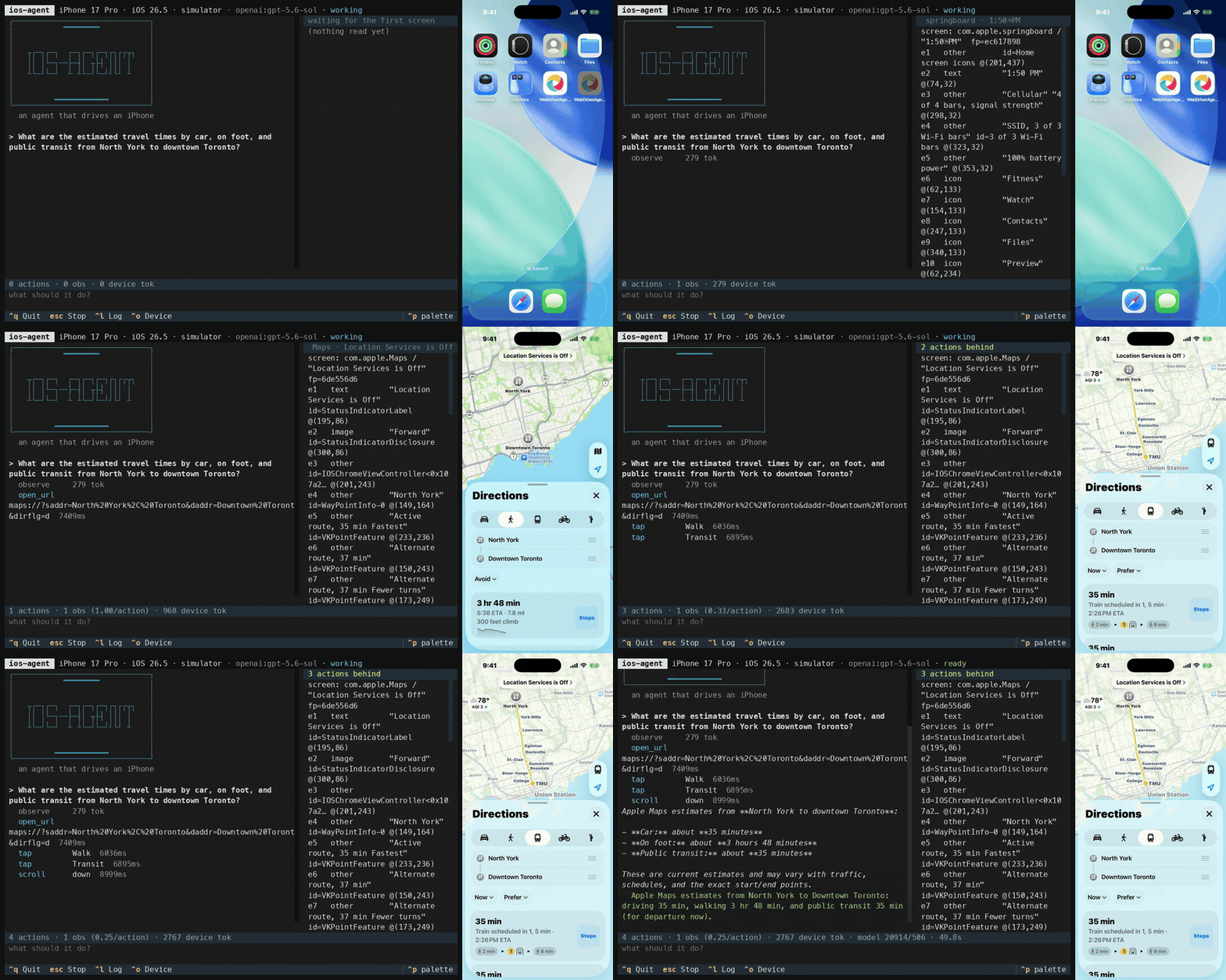
One goal, start to finish, at 2.5x. The agent deep-links into Maps for the driving time, then taps through to walking and transit and scrolls to read the detail: 4 actions, 1 observation, 2,767 device tokens, 49.8s of real time. The terminal is the agent’s own transcript; the phone is an iOS Simulator being driven by it.
uv sync && uv run ios-agent quickstartquickstart checks the toolchain, offers the repairs that are cheap enough to
be worth offering, builds WebDriverAgent if it is missing (about 20 seconds,
once), and drops you into manual mode, which drives the device by hand and
needs no API key. When you want the agent itself:
uv run ios-agent "turn on bold text"What you can do with it
Section titled “What you can do with it”| You want to | Start with |
|---|---|
| Hand an agent a goal and watch it work | uv run ios-agent "turn on bold text", walked through in the quickstart |
| Check that a change to your own app works | docs/check-your-app.md |
| Give Claude Code, Cursor or any MCP client hands on a device | ios-mcp serve, one entry in .mcp.json |
| Run it against your own iPhone, over a cable or Wi-Fi | docs/real-device-setup.md, then uv run ios-agent --pick "..." |
| Drive a device by hand, with no API key, to see what an agent would see | uv run ios-agent manual |
| Build your own agent on top, without the protocol in between | await run_goal(session, "...") or IosSession directly, see docs/library.md |
Typical goals: check that a change you just made works in the running app, change a setting, read an answer out of an app that has no API, or walk a flow on a phone you cannot hand to a test suite. docs/use-cases.md lists what works today, with the evidence for each and what is not supported yet.
Who it is for
Section titled “Who it is for”- People building agents that need iOS hands, from Claude Code, Cursor or any MCP client.
- iOS developers who want their coding agent to check a change on a simulator or on their own phone.
- Anyone studying agent engineering. The eval harness and the decision records show what was measured, and what was turned down because the numbers said no.
If you need Android, React Native profiling, Xcode builds, or many devices in parallel, another tool will suit you better. The documentation site has an honest comparison.