
Run a goal in the terminal
uv run ios-agent # open it, decide lateruv run ios-agent "turn on bold text" # give it a goaluv run ios-agent --pick "turn wi-fi off" # choose the device from a listuv run ios-agent manual # drive it by hand, no model neededuv run ios-agent devices # what is reachable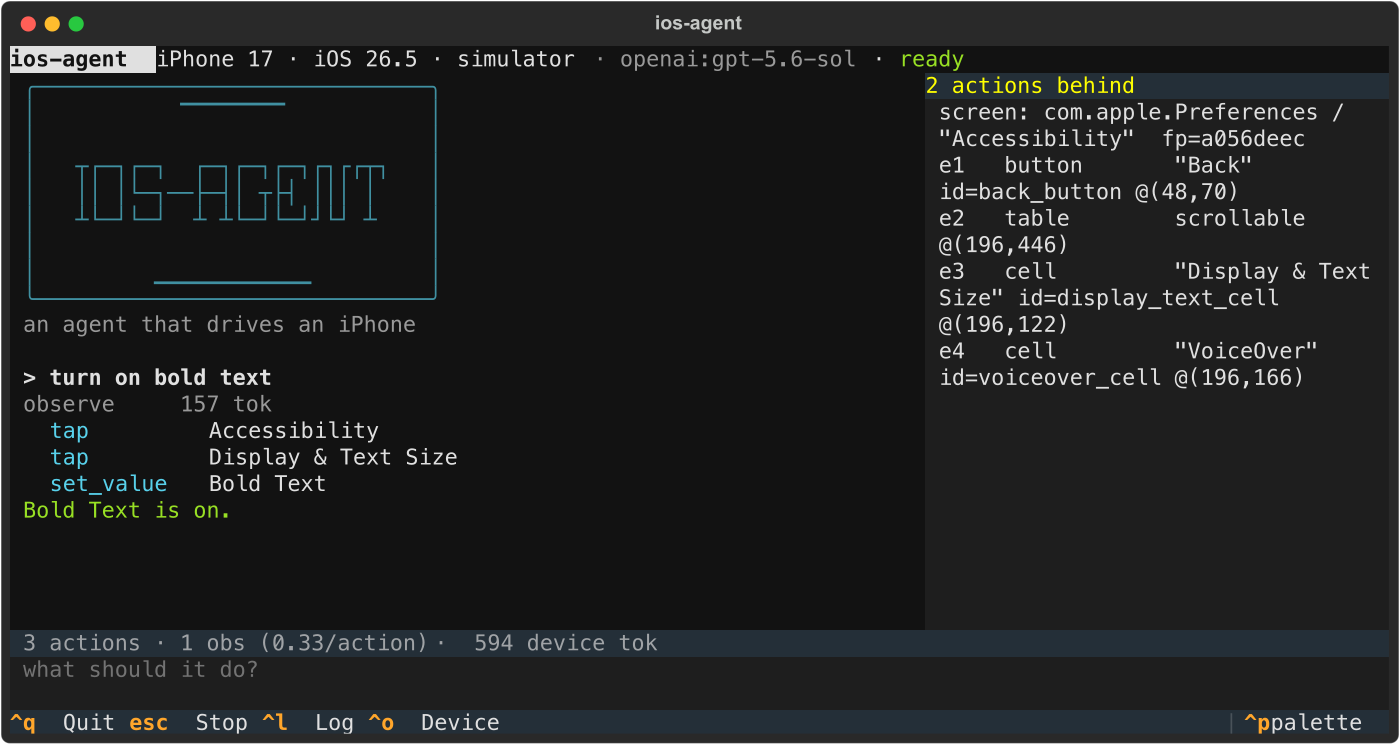
It streams the model’s reasoning as it arrives, shows the digest the model is reading beside it, and keeps the numbers on screen while they climb: actions, observations, device tokens, cost.
/ |
command menu, filtered as you type |
/device · ctrl+o |
switch phone or simulator mid-session |
esc |
stop at the next step, with a complete report; again to abort |
ctrl+r · ctrl+s |
re-read the screen · save the audit trail |
| drag to select | copies the selection to the clipboard, no keystroke needed |
--inline |
run in a short region under the prompt |
--no-tui |
plain lines, for a pipe |
manual mode needs no API key. It drives the agent’s nine verbs by hand,
which is the fastest way to debug perception on an app nobody has pointed this
at before.
The front end is held to one rule, asserted rather than argued: watching a
run may not change what it costs. tests/tui/test_cost.py runs the same task
wrapped and unwrapped and compares every counter by equality.
Choosing a model
Section titled “Choosing a model”The provider is configuration, not a dependency. The loop builds through
LangChain’s init_chat_model, so switching is two environment variables and an
extra:
uv sync --extra openaiIOS_AGENT_PROVIDER=openai IOS_AGENT_MODEL=gpt-6.1-sol uv run ios-agent "..."Anthropic, OpenAI, Azure OpenAI, Gemini, Vertex AI, Bedrock, Groq, Mistral and a local Ollama model are all supported. See agent/README.md.